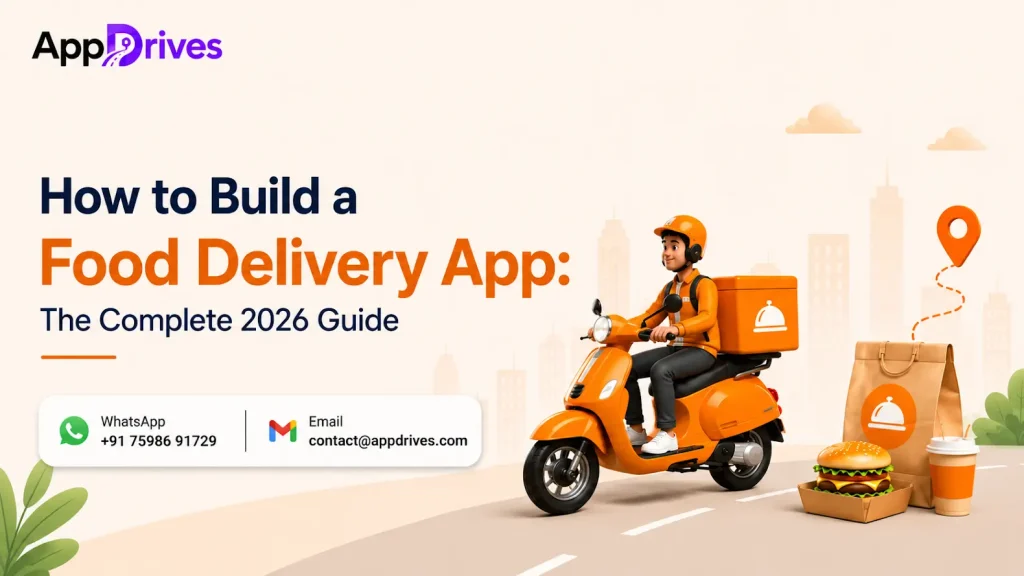
Food delivery, which was once considered a convenience, is now an everyday necessity for many consumers. Professionals, families and even restaurants rely on food delivery apps. According to the Fortune Business Insights report, the online food delivery market is expected to reach USD 728.83 billion by 2034. The market shows a strong growth rate, with a CAGR of 9.58%.
On the other hand, with the rise in smartphone usage, digital payment adoption, and changing consumer preferences, investing in food delivery app development is one of the most profitable businesses.
This guide will give you a brief overview of food delivery app development, its features, cost and development process.
What Is a Food Delivery App?
Food delivery app development is the process of designing, building, and deploying an application for people to order food online. A complete food delivery ecosystem usually consists of multiple applications working together. They are:
- Customer Application
- Restaurant Partner Application
- Delivery Partner Application
- Admin Dashboard
- Backend Management System
These applications use APIs and the cloud to provide a seamless ordering experience.
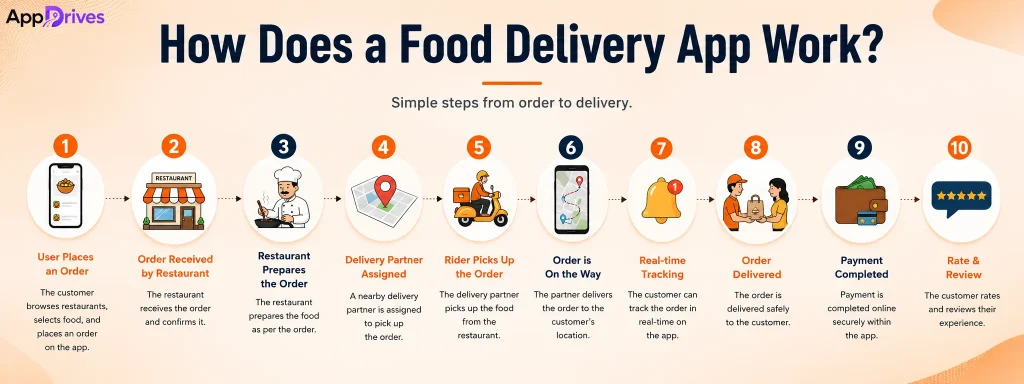
How Does a Food Delivery App Work?
A successful food delivery app works via four integrated applications. These different apps support different stakeholders. All together, these applications ensure to move effectively from placement to delivery.
The Four-Sided Ecosystem
Here is a crisp overview of the four-sided ecosystem. Customer app, restaurant app, delivery partner app, and admin app are the four pillars in the food delivery application. Each application is designed to serve specific needs.
Let’s look into the detailed overview of each app.
Customer Ordering Workflow
The customer begins by browsing the nearby restaurants based on rating, delivery time and others. After selecting the menu items, the customer reviews the cart. Here, they apply coupons and complete payment and confirm orders. Once a customer places the order, the restaurant confirms it. Live tracking is available for customers to monitor food preparation and driver location.
Restaurant Order Management Workflow
Restaurants receive orders via their management dashboard. Staff review the order and confirm their item availability. Once this is done, the food is prepared and order status is updated. After food is ready, the order is marked for pickup, which notifies the assigned delivery partner.
Delivery Partner Workflow
Delivery partners receive nearby delivery orders based on availability and location. After accepting the request, they go to the restaurant to collect the order and deliver it to the customer’s location. They also update the delivery progress throughout the journey.
Admin Management Workflow
Administrators monitor the entire platform via a centralized dashboard. They onboard restaurants and check the delivery partners. They also manage commissions and resolve disputes. The management analyzes the business metrics for further improvements and feature updates.
Types of Food Delivery Apps You Can Build
Businesses must choose the right development model. Business owners should be more careful here, as it impacts the long-term growth. Here is the explanation on the types of food delivery apps you can build:
Aggregator Marketplace Apps
Aggregator marketplace apps connect multiple restaurants in a single platform. This type allows consumers to compare preferred menus, prices, and delivery times. Revenues here are generated via commissions, delivery charges, subscriptions, and more. This model is best for entrepreneurs opting to build regional or nationwide marketplaces.
Single Restaurant Ordering Apps
Restaurants with an established customer base develop dedicated ordering apps. This reduces the marketplace commission. These apps are mostly built for direct customer relationships. They focus on loyalty programs, personalized offers and repeat purchases.
Multi Restaurant Marketplace Apps
Nowadays, most of the business owners use multi-restaurant marketplace app types to create a food delivery app. These platforms provide restaurants with dedicated management tools. They allow customers to access various brands within a unified system. This is the appropriate choice for managing franchise networks.
Cloud Kitchen Food Delivery Apps
Cloud kitchens operate without dine-in facilities. They rely on online ordering. Their applications prioritize efficient kitchen operations, delivery optimization, and order automation. They serve customers via one or multiple virtual brands.
Food Delivery App Development Revenue Models
The food delivery industry may looks simple from the outside. But it is a combination of a customer order, restaurant and delivery ride partnership. Behind every order transaction, there is a revenue system engineered. Though the margins are thin here, rising users make the platform more profitable. There are several monetization methods. Below is a breakdown of revenue models powering today’s food delivery apps.
Commission-Based Revenue
The primary source of revenue in food delivery platforms is a commission-based model. Restaurants pay a certain percentage for every completed order. They allow platforms to generate recurring revenue while the platform scales naturally with increasing customer transactions.
Delivery & Service Fees
Delivery and service fees are mostly charged to customers with respect to their distance, peak time and order value. These fees help to cover logistics, delivery compensation, and operational expenses for the platform.
Subscription Memberships
Subscription memberships benefit customers. Unlimited free deliveries, exclusive discounts, and priority delivery are some advantages. These are charged as a monthly or annual fee. This model creates predictable recurring revenue to push repeat orders and improve long-term retention.
Advertising & Sponsored Listings
This model is for restaurants. They pay a certain amount to the platform to feature their business at the top result. Sponsored listings increase visibility, attract customers and provide additional income to the platform.
Hybrid Monetization Model
The most successful on-demand food delivery app combines multiple revenue streams. Commission, delivery fees, advertising and promotional partnerships are combined in a single platform. This approach surges profitability, reduces reliance on a single income source and supports business growth.
How to Build an On-Demand Food Delivery App
The process to develop a food delivery app is an important process. It is necessary to have a thorough knowledge of the market and appropriate technologies. Companies should stick to the well-known roadmap and create the perfect application that will fit into the market requirements. Below you can find a guide on how to create a scalable food delivery platform.
Step 1: Conduct Market Research and Validate Your Idea
Determine your target audience, demand in the market, and competitors first. Analyze the existing food ordering apps to understand their strengths and weaknesses. In addition, your pricing policy and customers’ expectations are also being determined here. Choose a particular city or a niche restaurant that you want to target.
Step 2: Choose the Right Business Model
Decide on the right business model based on your goals and budget. You can go for developing an ordering app for a single restaurant, for multiple restaurants in a marketplace, or for a Cloud kitchen concept. The type of business model will affect the functionality of your app and scalability.
Step 3: Define User Flow and Platform Requirements
Map the complete journey for every stakeholder, including customers, restaurants, delivery partners, and administrators. Outline the process of user registration, navigation, and ordering. Also structure the payment mechanism and other processes. Clear workflow and feature requirements reduce unnecessary reworks and build an intuitive platform.
Step 4: Choose the Right Development Approach
Your development approach affects the project’s cost, timeline, maintenance, and long-term scalability. Businesses can choose native, cross-platform, or no-code solutions depending on their requirements.
| Approach | Cost | Development Speed | Performance | Scalability | Best For |
| Native | High | Moderate | Excellent | Excellent | Large businesses and enterprise applications |
| Cross-Platform | Medium | Fast | High | High | Startups and businesses targeting Android and iOS simultaneously |
| No-Code | Low | Very Fast | Basic | Limited | MVPs, prototypes, and idea validation |
Step 5: Design an Intuitive UI/UX
You should create an attractive UI/UX design. This would increase repeat purchases. You need to ensure users can easily navigate and find their desired cuisine and quickly track their orders.
Step 6: Choose the Best Tech Stack
Choose the best tech stack for the platform in terms of features and security. A good tech stack is critical during development and enables the best tech choice for current and future requirements.
Step 7: Build a Minimum Viable Product
You can develop an MVP version that consists of only essential features rather than creating a platform with all advanced features. MVP development will save much time and money during development.
| MVP Features | Full Product Features |
| User Registration | AI-Powered Recommendations |
| Restaurant Listings | Loyalty & Rewards Programs |
| Menu Browsing | Subscription Memberships |
| Cart & Checkout | Personalized Promotions |
| Secure Payments | Advanced Analytics Dashboard |
| Real-Time Order Tracking | Marketing Automation |
| Push Notifications | Multi-Language & Multi-Currency Support |
Step 8: Integrate Third Party APIs
Third-party APIs provide pre-existing services that make development easier. Integrating a payment gateway is a must API integration for a food delivery app. Other third-party integrations include maps for navigation and analytics tools for tracking. These are used to analyze user behaviour and business performance.
Step 9: Test Performance, Security, and Scalability
This phase helps to identify the errors before launching your product. This helps you ensure that the app is bug free. Check all functionalities and make sure that payments are processed securely.
Step 10: Launch Your App, Onboard Restaurants, Acquire Delivery Partners and Scale
At this stage, you need to launch your application. You can then start onboarding restaurants, acquiring delivery partners and start scaling your app. You need to do all this while ensuring that your service is of high quality and meeting the demands of your clients. It is important to keep on learning and improving in order to achieve the best results.
Best Tech Stack to Build a Food Ordering App
We use advanced technologies to build food delivery software. The table lists the set of technologies we use.
| Layer | Recommended Technologies |
| Mobile | Flutter, React Native |
| Backend | Node.js, Laravel, Python |
| Database | PostgreSQL, MongoDB |
| Cloud | AWS, Google Cloud |
| AI | OpenAI, Gemini |
Essential Features Required to Develop a Food Delivery App
A good food delivery system is made up of many features that complement each other in order to create a smooth food ordering process. Below is the list of features that should be included to build an efficient food delivery app MVP.
Customer App Features
Customers can browse restaurants, search menus, and place orders. To process this, certain features are integrated. They are listed below
User Registration
It includes the ability of the user to register using any one of the available methods including email, mobile number, or through social media logins. Authentication is done through OTP verification.
Restaurant Search
Customers should be allowed to search for restaurants based on the filters such as type of cuisine, location, ratings, delivery time, and discounts.
Menu Browsing
It includes the digital version of the restaurant menus along with the pictures, description, prices, and customization options.
Shopping Cart
The shopping cart feature enables shoppers to check the selected products, edit the quantities, and use any discount coupons they may have. This feature is also used to choose delivery addresses and calculate the final order value before proceeding to checkout.
Real-Time Order Tracking
Enable real-time tracking of the order from its confirmation to the preparation of the food, assignment of a driver, pick up, and estimated arrival time.
Restaurant Panel Features
Restaurants manage menus, receive orders, and update preparation status. They can handle these things in a single dashboard. The features here are listed below
Menu Management
This enables restaurants to create, modify, or delete menu items, change prices, and upload pictures of food. Additionally, this function enables them to create categories and specify whether a menu item is available or unavailable.
Order Management
Restaurant staff will pick up the order right away. While they can choose to either accept or reject an order, change the status of the order preparation, calculate how long it will take to cook and inform delivery partners that the order is ready to be delivered.
Inventory Management
Through inventory management, restaurants will be able to prevent overselling food and beverage products, update menu items, and have information about the availability of ingredients, making their operations more efficient and satisfying for customers.
Offer Management
Restaurants will be able to create promotional campaigns, discount vouchers, combos, and seasonal offers to attract customers, increase the value of orders and increase repeat orders.
Sales Dashboard
A sales dashboard will provide information about daily sales, total orders made, customer trends, popular dishes, and performance of the business.
Delivery Partner App Features
Delivery partners accept orders, access optimized routes, track deliveries, and update order status. They have separate features to handle the dashboard.
Order Assignment
Delivery partners get delivery orders that are located near them according to their location and availability. They have the option to accept or reject an order, which makes order assignment quick and effective.
Route Navigation
In-app GPS navigation helps to find efficient routes to the restaurant and customer address, which helps avoid traffic problems and makes delivery more efficient.
Delivery Status Updates
Drivers can update their delivery status, such as order accepted, order picked up, order in process, order on the way, and order is delivered, which are shown in real-time in the customer app.
Earnings Dashboard
Delivery partners can see their completed deliveries, daily or weekly earnings, incentive or bonuses, commissions earned, and the history of payments.
In-App Communication
There are integrated messaging or calling features through which delivery partners communicate with customers or restaurants securely without revealing any personal details.
Admin Panel Features
Administrators oversee users, restaurants, deliveries, payments, commissions, promotions, analytics, and platform performance via a centralized management dashboard.
User Management
The administrator is allowed to manage the customer accounts, registration verification, monitoring of user activities, handling complaints, suspension of any fraudulent account and provision of customer support when required.
Restaurant Management
The administrator manages the approval of the restaurant accounts, document verification, commissions management, restaurant monitoring, among other things.
Delivery Partner Management
The administrator onboards the delivery partners, verifies documents, assigns delivery areas, delivery partner monitoring, payouts management, as well as monitors the availability of drivers.
Order Management
The admin dashboard provides the administrators with a complete view of all orders in the system, allowing them to monitor order status, cancel orders and handle refunds and disputes.
Reports Dashboard
There is a complete reports dashboard that provides the platform owner with information on orders, revenue, growth in customer base, restaurant performance, delivery efficiency and commissions earned.
AI-Powered Features to Include in Food Delivery Apps in 2026
AI is transforming food delivery apps by enhancing customer experiences, streamlining operations, and improving decision-making. Integrating AI in apps helps businesses to scale and drive growth.
Personalized Food Recommendations
AI provides personalized recommendations by analyzing customer preferences, order history, and browsing behavior. This enhances user engagement, increases repeat purchases, and improves overall customer satisfaction.
Predictive Delivery ETA
AI examines traffic conditions, weather, food preparation speed, and other criteria to predict accurate delivery time. This enhances transparency and manages delivery-related inquiries.
AI Chat & Voice Ordering
AI chat and voice ordering help customers create a faster and more convenient ordering experience. Customers can easily search restaurants and order their meals.
Dynamic Pricing
AI adjusts the fees and offers based on demand, peak hours, and driver availability. This helps balance supply and demand and surges platform revenue and operational efficiency.
Demand Forecasting
AI also helps business owners forecast future orders by analyzing the history and seasonal trends, holidays, and other factors. This helps to optimize inventory and delivery options.
Third-Party API Integration for Food Delivery App Development
Third-party API integration is significant for food delivery apps without requiring businesses to build every feature from scratch. From secure payments and real-time navigation to notifications and analytics, API improves the speed and stimulates the user experience, and ensure seamless communication across the entire platform.
- Payment Gateway APIs
- Maps Navigation APIs
- SMS OTP APIs
- Push Notification APIs
- Analytics CRM APIs
How Much Does It Cost to Build a Food Delivery App?
The food delivery app development cost is impacted by factors such as the app’s complexity, feature set, and development approach. Also, tech stacks, third-party integration, and customization influence the budget of the development. Starting with a basic MVP is usually lower when compared to a fully featured platform with AI integration. Moreover, advanced analytics and scalable infrastructure increase the development and maintenance cost.
How Long Does It Take to Build a Food Delivery App?
Food delivery app development is based on the platform’s complexity, features, design requirements, and testing scope. Developing a basic MVP takes a few months, whereas a feature-rich food delivery platform takes a longer time. This additional timeline is mainly due to the integration of multiple user panels, advanced integrations, and AI capabilities. Proper planning and an experienced development team help accelerate the process without compromising quality.
Legal, Compliance, and Security Required to Create a Food Delivery App
Every food delivery app development requires compliance with security, legal, and industry regulations to protect data and ensure safe payment operations. This builds trust among users, restaurants, and delivery partners.
Data Privacy and Payment Compliance
Protects data via encryption and secure authentication. The application should comply with regulations such as PCI DSS, GDPR, and DPDP to ensure secure payment processing and data handling.
Food Safety and Business Licensing
Verify that restaurant partners hold valid food safety licenses and business permits before onboarding. Regular compliance checks help to maintain food quality, trust, and regulatory adherence.
Driver Classification and Insurance
Clearly define delivery partner roles based on local labor laws and provide appropriate insurance coverage to protect drivers, customers, and the platform during delivery operations and unforeseen incidents.
Turn Your Food Delivery App Idea into Reality with AppDrives
Building a successful food delivery app requires the right blend of strategy and technology. At AppDrives, a well-known food delivery app development company, we help startups, restaurants, cloud kitchens, and enterprises transform their ideas into scalable applications.
If you are looking to launch an MVP or a feature-rich marketplace, partner with AppDrives for 24/7 support and growth. Our team delivers secure and scalable solutions customized to your needs and plans. From start to launch, we ensure your platform is built for high performance and reliability.
Frequently Asked Questions
Q1. How much does it cost to build a food delivery app?
The cost depends on app complexity, features, user panels, integrations, and customization. An MVP costs less, while enterprise-grade platforms require a significantly higher investment.
Q2. How long does it take to build a food delivery app?
Development time varies based on project scope and features. An MVP takes a few months, while a fully featured platform requires additional development and testing.
Q3. What is the best tech stack for a food delivery app?
A modern stack typically includes Flutter or React Native, Node.js or Python, PostgreSQL or MongoDB, cloud hosting, payment gateways, and mapping APIs.
Q4. What essential features should a food delivery app include?
Core features include user registration, restaurant search, menu browsing, secure payments, order tracking, restaurant management, driver management, notifications, and an admin dashboard.
Q5. How do food delivery apps make money?
Food delivery apps generate revenue through restaurant commissions, delivery fees, subscription memberships, sponsored listings, advertisements, and other value-added services or partnerships.
Q6. Can I build a food delivery app without coding?
Yes. No-code platforms can help create a basic MVP, but custom development is recommended for better scalability, flexibility, performance, and long-term business growth.
Q7. Do I need separate apps for customers, restaurants, delivery partners, and admins?
Yes. Separate applications or dashboards streamline operations, improve user experience, simplify management, and ensure each stakeholder has role-specific functionality and access.
Q8. Which third-party APIs are required for a food delivery app?
Essential APIs include payment gateways, maps and navigation, SMS and OTP verification, push notifications, analytics, CRM, and cloud communication services.
Q9. Should I choose custom development or a white-label solution?
White-label solutions offer faster deployment, while custom development provides greater flexibility, branding, scalability, and control, making it ideal for long-term business growth.
Q10. How do I scale a food delivery app after launch?
Scale your platform by onboarding more restaurants, expanding delivery coverage, introducing AI features, optimizing performance, analyzing user feedback, and continuously releasing feature updates.